


Written by Marijn Overvest | Reviewed by Sjoerd Goedhart | Fact Checked by Ruud Emonds | Our editorial policy
Claude for Procurement: The Complete 2026 Guide
As taught in the Claude Cowork For Procurement Course / ★★★★★ 4.9 rating
- What Claude is (and Why Procurement Teams Should Care in 2026)
- The Five Procurement Workflows Claude Does Best
- The Claude Features Procurement Needs to Understand
- What Separates Procurement Teams Who Get Value from Claude from Those Who Don't
- Policy, Data, and What Procurement Leaders Should Decide Before Rolling Claude Out
- A Seven-Day Claude Rollout Plan for Procurement
- Where Claude Fits in a Multi-Tool Procurement AI Stack
- Conclusion
- Frequently asked questions
- Claude is Anthropic's AI assistant, and the one procurement teams are increasingly pairing with ChatGPT or Copilot for higher-complexity work like contract review, risk analysis, and category strategy.
- Only about 19% of procurement teams have tried Claude today, according to Procurement Tactics' 2026 AI Readiness in Procurement survey. That gap is an opportunity.
- Claude's standout features for procurement are Projects, Memory, Skills, Connectors, Artifacts, Computer Use, and Cowork mode, each mapped to specific procurement workflows in this guide.
What Claude is (and Why Procurement Teams Should Care in 2026)
Claude is the AI assistant built by Anthropic. For procurement, the simplest way to think about it is this: Claude is a model trained to be particularly good at following multi-step instructions, working with long documents, and explaining its reasoning. Those three properties line up unusually well with how procurement actually works, long contracts, multi-step analyses, and the need to defend every conclusion to a CFO or a supplier.
Most procurement teams first encountered AI through ChatGPT. It introduced the category, set expectations, and has become the default tool for drafting emails, summarising meetings, and light-weight research. That is useful work, but it is also the surface. The harder work, reviewing a 60-page supplier contract, building a risk register, running a category analysis from a spend file, is where the choice of tool starts to matter. Claude is designed for that harder work.
According to Procurement Tactics' 2026 AI Readiness in Procurement survey around 19% of procurement teams currently use Claude. ChatGPT and Microsoft 365 Copilot lead the field. That adoption gap matters because it means procurement teams who learn Claude early are building capability their peers do not yet have. The learning curve on Claude is short; the ceiling is high.
This guide is the starting point for that capability. It covers what Claude does that is distinctive for procurement, the specific workflows where it outperforms alternatives, the features to understand before using it at scale, and the policy and rollout decisions that separate teams who get value from teams who generate chat transcripts.
The Five Procurement Workflows Claude Does Best
There is a temptation with any new AI tool to try everything at once. That is the fastest path to abandonment. The more useful question is: where does Claude earn its place in a procurement workflow that already has ChatGPT, Copilot, or Gemini running? Five answers consistently emerge from procurement teams that have tested all four.
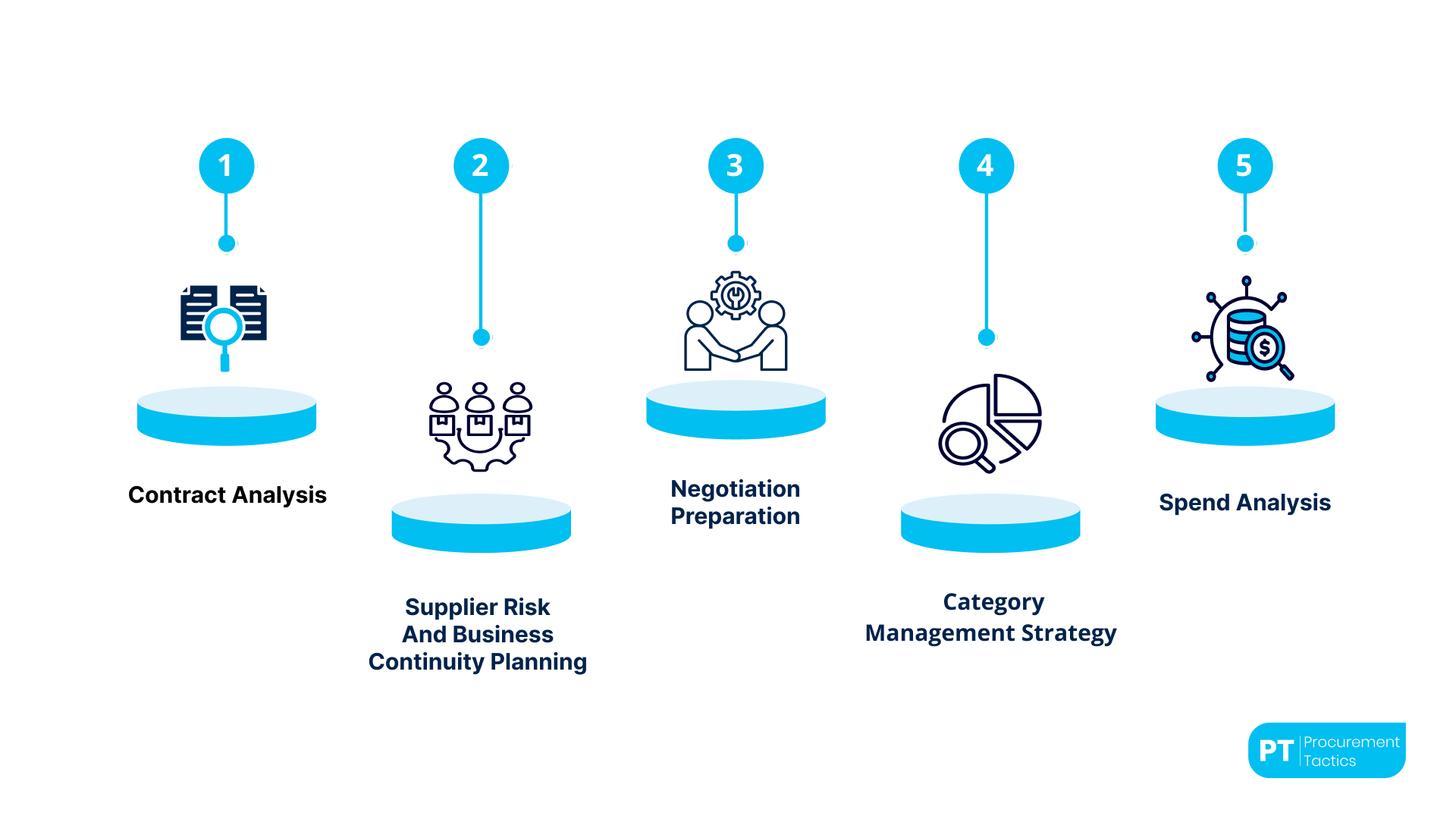
1. Contract analysis
Supplier contracts are long, dense, and written in a language designed to protect the supplier. Claude's strength on long documents and multi-step reasoning means it can read a 40-page supplier contract, score the KPI scorecard against actuals, identify every clause creating commercial or operational risk, and flag unclaimed penalty rebates. Procurement teams running this workflow have surfaced six-figure recoveries from a single contract review, penalty clauses that had been in place for years but were never invoked because nobody had read the agreement carefully since it was signed.
2. Supplier risk and business continuity planning
Most procurement teams know they should have a Business Continuity Plan for their top suppliers. Few actually do, the survey cited above found only 9% of procurement teams describe their operating model as "data-driven and proactive". The rest are reactive or mostly reactive. Claude turns a supplier list, a spend overview, and a risk framework into a scored risk register with named mitigations, named owners, and named contingency actions in a single working session.
3. Negotiation preparation
Preparation is where most procurement negotiations are won or lost. Not the tactics at the table, the framing before it. Claude builds a complete preparation pack: the nine questions every procurement professional should answer before a significant negotiation, a counterpart-arguments table for five commercial levers, and a supplier comparison matrix. The pack is the difference between improvising with some notes and walking in with a position.
4. Category management strategy
The theory of category management is well documented and poorly executed. Kraljic, SWOT, supplier segmentation, spend-and-demand profiling, most procurement pros can describe the framework. Few have the time to apply it rigorously to their own category. Claude takes a spend file, a supplier list, a market intelligence brief, and a company briefing document and produces a complete nine-slide category strategy, ready for a CPO review, in one session.
5. Spend analysis
Spend files are where the savings hide and where the hours disappear. ABC-XYZ classification, concentration risk, tail spend, maverick buying: every procurement team wants these answers and few have the time to assemble them at the frequency they need. Claude's ability to work directly with spreadsheet-grade data, combined with Claude for Excel for teams that prefer to stay inside their spreadsheet, makes monthly or even weekly spend refreshes realistic rather than aspirational.

Each of these workflows has a dedicated guide on Procurement Tactics. Teams that want the structured version of the underlying methodology can explore the AI Fundamentals for Procurement Teams program, which covers the foundational prompt engineering and workflow design that makes these use cases reliable rather than occasional wins.
The Claude Features Procurement Needs to Understand
Claude has a handful of features that change how it works compared with a plain ChatGPT chat. Understanding them is the difference between treating Claude as a chatbot and treating it as an analyst.
Projects
A Project in Claude is a persistent workspace. It can hold files, custom instructions, and conversation history scoped to a specific piece of work, say, a supplier contract renewal, or a category strategy. The practical benefit is context: a Project knows the company, the supplier, the spend context, and the rules of engagement every time the user returns, without re-explaining.
Memory
Memory is a lighter-weight context mechanism than Projects. It stores facts Claude should remember across all conversations, the user's role, the company's spend baseline, and the procurement team's reporting cadence. Used well, Memory means every answer arrives with a baseline of company context. Used carelessly, it becomes a data-protection problem.
Skills
Skills are reusable workflows, a named routine that Claude can run on demand. A procurement Skill might be "Score an RFP response", "Classify a spend file into ABC-XYZ", or "Review a contract for unclaimed penalties. Skills turn one-off prompts into a capability the whole procurement team can call on, rather than being locked inside one person's prompt history.
Connectors
Connectors link Claude to systems outside its chat interface: Microsoft SharePoint and Teams, Google Drive, and a growing list of ERPs and supplier data sources. For procurement, the relevant connectors are typically the contract repository, the supplier master data system, and the communication platform used with internal stakeholders.
Artifacts
Artifacts are the canvas on which Claude produces things, interactive documents, diagrams, or small applications. For procurement, the most practical application is dashboards: a supplier risk heat-map, a rolling savings tracker, or a category spend breakdown that updates when underlying data changes.
Computer Use
Computer Use is Claude's ability to take actions on a computer, logging into a supplier portal, exporting a performance report, and updating a record in a contract repository. It is the most agentic Claude feature today, and the one that most clearly divides procurement teams into "cautious adopters" and "not yet". Both responses are reasonable. The question is not whether Computer Use is impressive; it is whether the specific task is repetitive enough, bounded enough, and safe enough that automation creates value without creating risk.
Cowork mode
Cowork is the mode where Claude works with files directly on a user's computer, reading, writing, and building in parallel with the human user. It is the feature that makes Claude feel less like a chatbot and more like an analyst working alongside a procurement professional. Most of the use cases in this guide assume Cowork is enabled.
From the field

Describing the C-suite mandate that pushed procurement into AI.
What Separates Procurement Teams Who Get Value from Claude from Those Who Don't
Claude is not magic, and it is not free. The procurement teams that extract real value from it share three practical habits.
They invest ten minutes in a briefing document. Claude's answers are only as good as the context it is given. A three-paragraph briefing document, the company's profile, the procurement team's structure, the current category focus, and the commercial constraints transform the quality of every subsequent interaction. Teams skipping this step end up with generic output and conclude that Claude does not understand procurement. It understands procurement perfectly well; it simply has no idea which procurement team is asking the question.
They use Projects, not one-off chats. Starting a fresh chat every time is how procurement teams burn time re-explaining context. A Project per category, per supplier renewal, or per initiative keeps context compounding. The Project becomes more useful every week it is in use.
They validate every conclusion. Claude is confident in writing and careful in reasoning, but it will occasionally produce a number that looks right and isn't. Procurement work rewards a habit of spot-checking the most important figures, the total spend, the concentration percentage, and the penalty calculation against the source data. Done well, validation is a ten-second check that preserves the hour of work behind it.
The teams that ignore these three habits still get value, but it is sporadic. The teams that adopt them see Claude shift from a novelty to a routine part of how procurement work gets done.
Policy, Data, and What Procurement Leaders Should Decide Before Rolling Claude Out
The Procurement Tactics 2026 survey found 40% of procurement organisations have no formal AI policy and no plans to create one. Another 31% are still working on it. Only 17% have an actively enforced policy. Rolling out Claude, or any AI tool, without an answer to a few policy questions creates preventable risk.
Data classification
The first question is what categories of procurement data are appropriate for Claude, and which must stay inside the organisation's own systems. Supplier names and performance data, standard contract terms, and general spend analysis are usually fine.
Personally identifiable information, confidential commercial terms from suppliers who have not consented, and regulated data (for example, health or financial data inside a procurement context) typically are not. A two-paragraph data-classification table, in the policy, not in a separate document nobody reads, is usually enough.
Memory and Projects retention
Claude's Memory and Projects retain context across conversations. That is exactly what makes them useful and exactly what makes a policy necessary. The policy should specify what types of content are appropriate for Memory versus Projects versus a one-off chat, and what the review cadence looks like for a Project that is no longer in active use.
Computer Use boundaries
If the procurement team plans to use Computer Use, the policy should name the workflows where it is permitted (usually read-only and bounded), the workflows where it is explicitly not permitted (typically anything involving financial transactions, supplier contracting, or writes to master data without human approval), and the audit requirements for any session where Computer Use was active.
None of these decisions needs to be complex. They need to be made once and written down. The AI Fundamentals for Procurement Teams program includes a ready-to-edit AI policy template as part of the policy module, procurement leaders adapting an existing template, typically cover the necessary ground in an afternoon.
A Seven-Day Claude Rollout Plan for Procurement
A realistic rollout plan assumes procurement professionals are busy, sceptical, and have seen AI tools oversold before. Seven days is enough to move from "I have an account" to "I use this every day for real work", if the first few days are designed well.
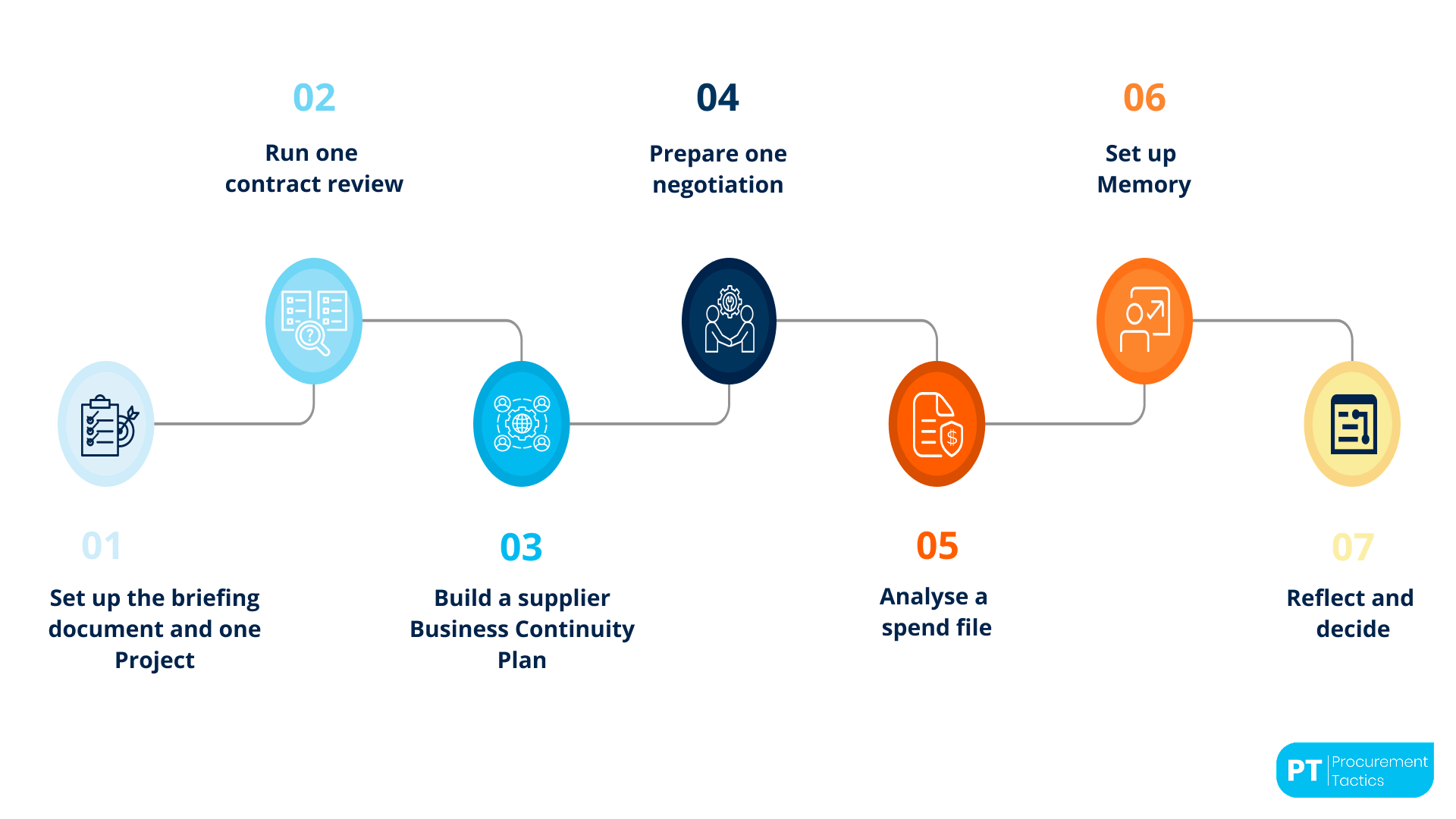
Day 1, Set up the briefing document and one Project. Write the three-paragraph company and procurement briefing. Create a Project for the most active current initiative (a supplier renewal, a category review, a risk assessment). Upload the relevant files. Ignore every other feature for now.
Day 2, Run one contract review. Upload a real supplier contract. Use a contract review prompt (or a template) and work through Claude's output. Find one commercial finding that would justify the exercise, usually an uninvoked clause, a misaligned KPI, or a renewal risk.
Day 3, Build a supplier Business Continuity Plan. Use the five-supplier risk framework and Claude's scoring logic. Review and refine the output. Save the result as the first real artefact produced with Claude.
Day 4, Prepare one negotiation. Pick an upcoming supplier conversation. Run the nine-question preparation analysis and the counterpart arguments table. Walk into the negotiation with the pack; debrief afterwards on what actually happened.
Day 5, Analyse a spend file. Load the most recent spend file into Claude. Ask for ABC-XYZ classification, concentration risk, and tail spend detection. Validate the top-line numbers against the source file.
Day 6, Set up Memory. Add the facts Claude should know across every conversation, the user's role, the procurement team's structure, and the company's fiscal calendar. Review what is in Memory against the data classification policy; remove anything that does not belong.
Day 7, Reflect and decide. Which of the six workflows delivered real value? Which felt like friction? Which should become the user's default starting point in Claude? The answers drive whether Claude becomes a daily tool or an occasional one, and they tend to be clear after the first week.
Where Claude Fits in a Multi-Tool Procurement AI Stack
Most procurement teams running AI seriously end up with more than one tool, not fewer. That is not a problem; it is an optimisation. Microsoft 365 Copilot typically owns the "inside Excel, Outlook, and Teams" workflows because that is where procurement already lives. ChatGPT often keeps the short-turn drafting, email, and research work because it is familiar and fast. Claude tends to earn its place on the higher-complexity work: long contracts, multi-step analyses, agentic workflows, and anything where the cost of a bad output is high.
The honest framing is that the four major AI tools, Claude, ChatGPT, Copilot, and Gemini, are not interchangeable. Each has a set of workflows where it is genuinely better than the others, and a set where the differences are small enough that familiarity should win. The strategic question for procurement leaders is not "which one AI tool do we pick" but "which workflows go to which tool, and what does the team need to learn to use each one well".
That is the subject of Procurement Tactics' comparison guide on Claude, ChatGPT, Copilot, and Gemini for procurement, a side-by-side benchmark on five core procurement tasks. It is the starting point for the "which tool for which job" conversation with a CPO or IT.
Related resource: The Claude Memory Guide, The 10-minute Memory setup for procurement, with the 6-category template and the common pitfalls to avoid.
Related resource: The Claude Desktop & Cowork Cheatsheet, Keyboard shortcuts, Cowork features, slash commands, and the quick reference card every procurement Claude user should have on their desk.
Conclusion
Claude is becoming one of the most useful AI tools for procurement teams, especially for work that involves complexity, large amounts of information, and careful decision-making. While tools like ChatGPT and Copilot are excellent for fast drafting and everyday tasks, Claude stands out in workflows like contract analysis, supplier risk assessments, negotiation preparation, and category strategy work.
But the teams getting the most value from Claude are not treating it like a magic solution. They are treating it like a skilled analyst that still needs direction, context, and validation. A simple briefing document, well-structured Projects, and a habit of checking key outputs often make the difference between generic results and genuinely valuable procurement insights.
For procurement leaders, the conversation around AI is also changing. The question is no longer whether procurement should use AI. The real question is how teams can use the right AI tools for the right workflows while building policies and capabilities that make adoption practical and sustainable.
Claude will not replace procurement professionals. But procurement professionals who learn how to work effectively with tools like Claude will likely have a major advantage over those who do not. And as AI adoption across procurement continues to grow, that advantage may compound faster than many teams expect.
Frequentlyasked questions
Is Claude better than ChatGPT for procurement?
For specific workflows, long contract analysis, multi-step risk work, and agentic automations, Claude is often the stronger option. For short-turn drafting, summarisation, and day-to-day research, the two are close enough that familiarity and workflow fit should win.
What does Claude cost for a procurement team?
Claude has a free tier for individual use, a paid Pro plan (typically around $20/user/month) for professional use, and a Team plan for collaborative use. Enterprise pricing with custom data-handling terms is available via Anthropic directly. Costs shift, the current list is on Anthropic's website.
Is it safe to upload a supplier contract to Claude?
It depends on the contract, the plan tier, and the procurement team's data policy. Standard supplier contracts with commercial terms are usually appropriate on a paid Claude plan; contracts containing regulated data or information from suppliers who have not consented to third-party AI processing usually are not. The data-classification section of an AI policy is the right place to settle this.
Can Claude connect to our ERP?
Claude's Connectors support a growing list of enterprise systems, Microsoft SharePoint, Microsoft Teams, Google Drive, and a number of ERPs via published connectors. For systems without a direct connector, uploading files from the ERP into a Claude Project is the usual pattern. Direct writes into an ERP from Claude are possible via Computer Use but should be policy-gated.
How long does it take to get a procurement team using Claude effectively?
Seven to ten days for an individual procurement professional to move from first login to daily use, assuming they follow a structured rollout. Three to six weeks for a team, including policy, training, and workflow adoption. Procurement teams that invest in structured training, such as the AI Fundamentals for Procurement Teams program, tend to reach productive use faster than teams learning in isolation.
Which Claude features matter most for procurement?
Projects (persistent workspaces), Memory (cross-chat context), Skills (reusable workflows), Connectors (system integration), and Cowork mode (direct file manipulation) are the five that most procurement teams use daily. Artifacts and Computer Use are powerful but more situational.

About the author
My name is Marijn Overvest, I’m the founder of Procurement Tactics. I have a deep passion for procurement, and I’ve upskilled over 200 procurement teams from all over the world. When I’m not working, I love running and cycling.
