


Written by Marijn Overvest | Reviewed by Sjoerd Goedhart | Fact Checked by Ruud Emonds | Our editorial policy
Claude Projects for Procurement: The 15-Minute Setup Guide
As taught in the Claude Cowork For Procurement Course / ★★★★★ 4.9 rating
Table of contents
- Why Claude's Answers Feel Generic Until You Build a Project
- What a Claude Project Contains
- The 7-Field Procurement Briefing Document
- One Project Per What, The Scoping Question
- Projects vs Memory vs Cowork, How They Work Together
- Setting Up Your First Procurement Project in 15 Minutes
- Governance and Sharing, Who Sees What
- Conclusion
- Frequently asked questions
- A Claude Project is a persistent workspace, files, instructions, and conversation history scoped to a specific piece of procurement work.
- Used well, a Project means Claude already knows the supplier, the category, the commercial context, and the rules of engagement every time the procurement professional returns. No re-briefing.
- The foundational component is a briefing document, seven fields that tell Claude what the organisation is, what the category looks like, and what the procurement team cares about.
Why Claude's Answers Feel Generic Until You Build a Project
The most common complaint from procurement teams new to Claude is that the answers feel generic. "This could apply to any procurement organisation" is the verdict after the first few chats. The complaint is accurate, and the reason is not that Claude is weak. The reason is that Claude has no way of knowing which procurement organisation it is answering for.
Claude, without context, has to treat every question as if asked by a general procurement professional at a general company. The output is competent but generic: the sort of advice you might find in a procurement textbook, refined for the specific question but not for the specific organisation. Claude, with context, the organisation's spend profile, the category dynamics, the commercial constraints, and the operating model, produces output that is specific to the procurement team asking the question.
Projects are Claude's primary mechanism for providing that context. A Project is a persistent workspace: files, custom instructions, and conversation history scoped to a specific piece of work. Set up correctly, a Project means Claude's first answer in a new conversation is already informed by the organisation's context, the category's structure, and the specific work that the Project exists to support.
In conversations with procurement leaders over the past year, the teams that describe Claude as genuinely transformative almost uniformly run Projects. The teams that describe Claude as "not what we expected" almost uniformly do not. The feature gap between those two groups is one fifteen-minute setup per Project.
What a Claude Project Contains
A Project has four components, each of which shapes the output Claude produces.
1. Custom instructions
The role, scope, and output preferences for this specific Project. Example: "You are an analyst supporting the Packaging category team at a European manufacturer. Outputs should be concise, British English, and structured as markdown tables where relevant. When analysing suppliers, always reference the performance data in the uploaded scorecard."
2. Uploaded files
The documents that define the Project's subject matter. For a Packaging category Project: the spend overview, the supplier list with performance data, the contract register, the market intelligence brief, and the company briefing document. For a specific supplier renewal Project: the current contract, performance data, renewal correspondence, and comparison of suppliers.
3. Conversation history
Every interaction inside the Project is scoped to the Project. The procurement professional can start a new conversation thread without losing the accumulated context from previous work. This is what makes Projects feel like a workspace rather than a chat.
4. Knowledge (enterprise tier)
On the enterprise Claude plans, additional knowledge base capabilities let Projects pull from shared repositories of information. Most procurement teams begin with file uploads and only graduate to a knowledge base setup when the library of source content becomes large.
Claude Projects for Procurement
The full Claude Projects guide, step-by-step creation, five procurement Projects to build first, how to write effective instructions, and the common mistakes that waste your 200,000-token capacity.

The 7-Field Procurement Briefing Document
The briefing document is the single most important file in any procurement Claude Project. It is what tells Claude what the organisation is, what the category looks like, and what the procurement team actually cares about. A good briefing document changes every subsequent answer Claude produces in the Project.
Seven fields are enough.
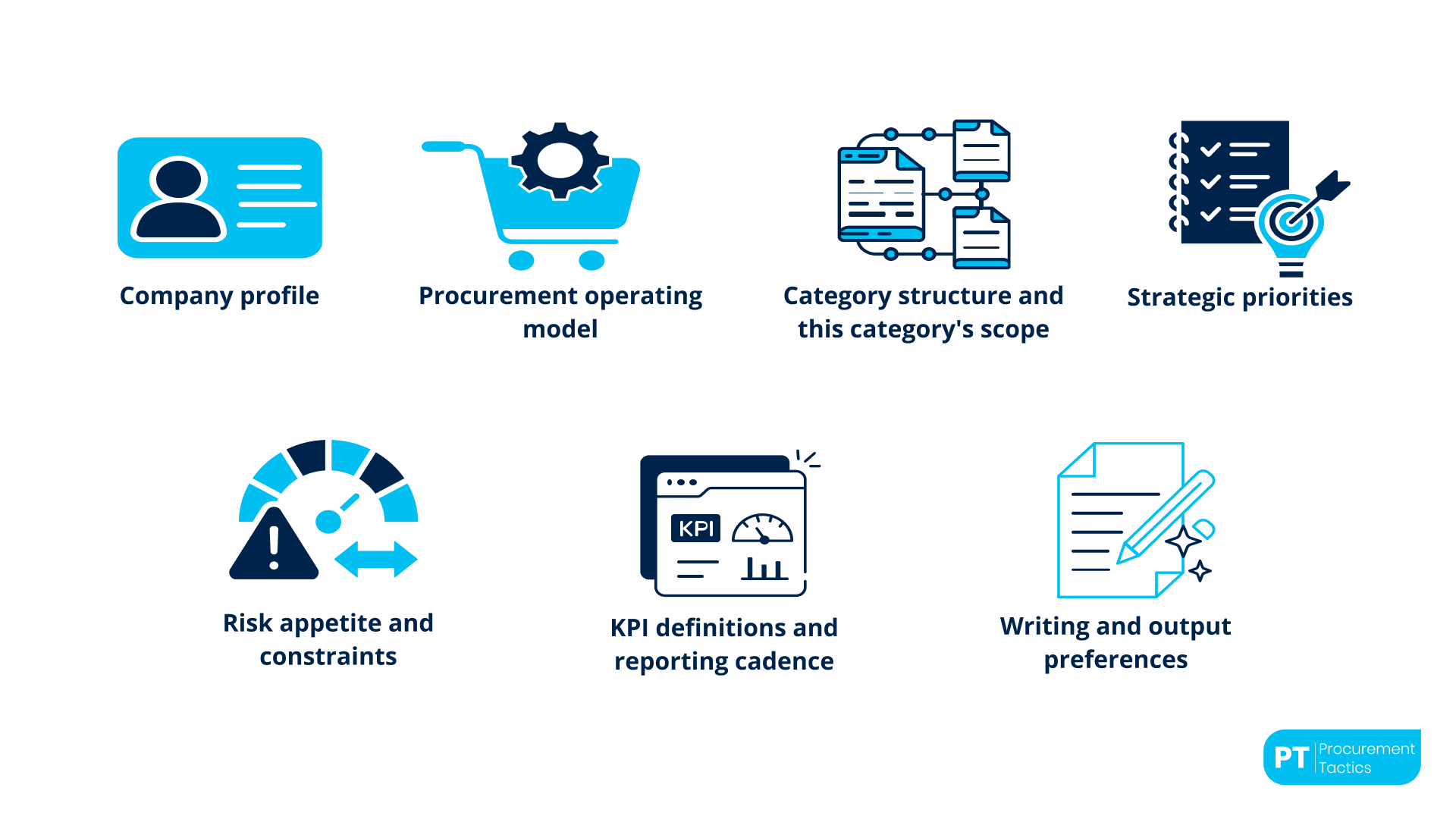
1. Company profile
Industry, scale, geographic footprint, business model. "European manufacturer producing industrial components. Revenue is approximately €2 billion. Operations across 12 countries, headquartered in Germany. Manufacturing sites in Germany, Poland, and Mexico."
2. Procurement operating model
The team structure, the reporting relationships, and the approval thresholds. "Procurement function of 14 FTEs, centralised model with category managers aligned to manufacturing sites. CPO reports to CFO. Contract approvals above €500K require the Head of Procurement sign-off."
3. Category structure and this category's scope
The category taxonomy and the specific scope of this Project's category. "Category taxonomy: six top-level direct categories plus four indirect. This Project: Packaging, €8 million annual spend, primary supplier concentration 62%."
4. Strategic priorities
The procurement team's top priorities for the fiscal year, with any category-specific priorities highlighted. "FY26 priorities: supplier risk reduction in single-source categories (relevant to Packaging), 4% savings target on top-20 suppliers, AI adoption across the team."
5. Risk appetite and constraints
The commercial and operational constraints that shape decisions. "Low tolerance for supply continuity risk given manufacturing dependencies. Moderate tolerance for commercial risk. Regulatory constraints: CSRD reporting requirements begin FY27."
6. KPI definitions and reporting cadence
How the organisation measures procurement performance. "Savings methodology aligned with finance as of Q2 2025. Primary KPIs: realised savings against baseline, on-time delivery, supplier concentration ratio, working capital impact. Reporting cadence: monthly to Finance, quarterly to CFO."
7. Writing and output preferences
How the procurement team likes its deliverables formatted. "Output format preferences: concise, British English, scorecards as markdown tables, executive summaries at the top of longer outputs, risk items flagged with likelihood and impact scores."
Two to three pages cover these seven fields comfortably. The briefing document is reusable across every Project in the same organisation, only field three (the category-specific scope) changes.
From the field

Category Manager reflecting on the before-and-after of Claude Projects adoption
One Project Per What, The Scoping Question
The scoping question matters because projects' compound context over time. A Project set up at the right scope becomes increasingly useful every time the procurement team works inside it. A Project set up at the wrong scope produces context friction instead of context leverage.
The scoping pattern that works for most procurement teams.
One Project per strategic category. The category Project holds the spend overview, the supplier list, the market brief, and accumulates conversation history around category-level work, strategy refreshes, supplier reviews, consolidation analyses, and risk assessments. This is the most common Project type and usually the most valuable.
One Project per active supplier renewal. When a strategic supplier renewal is in flight, a dedicated Project keeps the renewal-specific context together, the current contract, the performance history, the negotiation prep, and the renewal correspondence. The Project retires when the renewal completes.
One Project per major initiative. Consolidation programmes, supplier rationalisation efforts, ESG transition programmes, anything that touches multiple suppliers, categories, or stakeholders, and runs for a defined period. The initiative Project consolidates the cross-cutting context that would otherwise get lost.
A procurement function of twelve to fifteen people typically runs five to fifteen active Projects at any time. Below five, the Project mechanism is underused. Above twenty, Projects usually start duplicating each other, and the context is harder to maintain. The exact number depends on the procurement team's structure and the number of strategic categories.
Projects vs Memory vs Cowork, How They Work Together
The three-layer context model for Claude in procurement work combines Memory, Projects, and Cowork. Each does something the others do not.
Memory provides the always-on organisational baseline, the user's role, the company's fiscal calendar, and the standard frameworks the team uses. Memory applies to every Claude conversation, inside Projects and outside them.
Projects provide the work-specific context, the files, the conversation history, and the custom instructions scoped to one piece of work. Project context layers on top of the memory inside that Project.
Cowork provides the file-level working capability, Claude reading, writing, and producing files directly on the user's computer. Cowork mode is a way of working inside a Project, not a replacement for it.
The full setup for an effective procurement Claude user looks like this: Memory configured with the always-on context (ten minutes, once); a Project per strategic area of work (fifteen minutes each, whenever a new one is needed); Cowork mode enabled for the file-intensive work. The compound effect is what separates procurement teams getting real value from Claude from teams treating it as a chatbot.
Setting Up Your First Procurement Project in 15 Minutes
The sequence that works for the first Project.
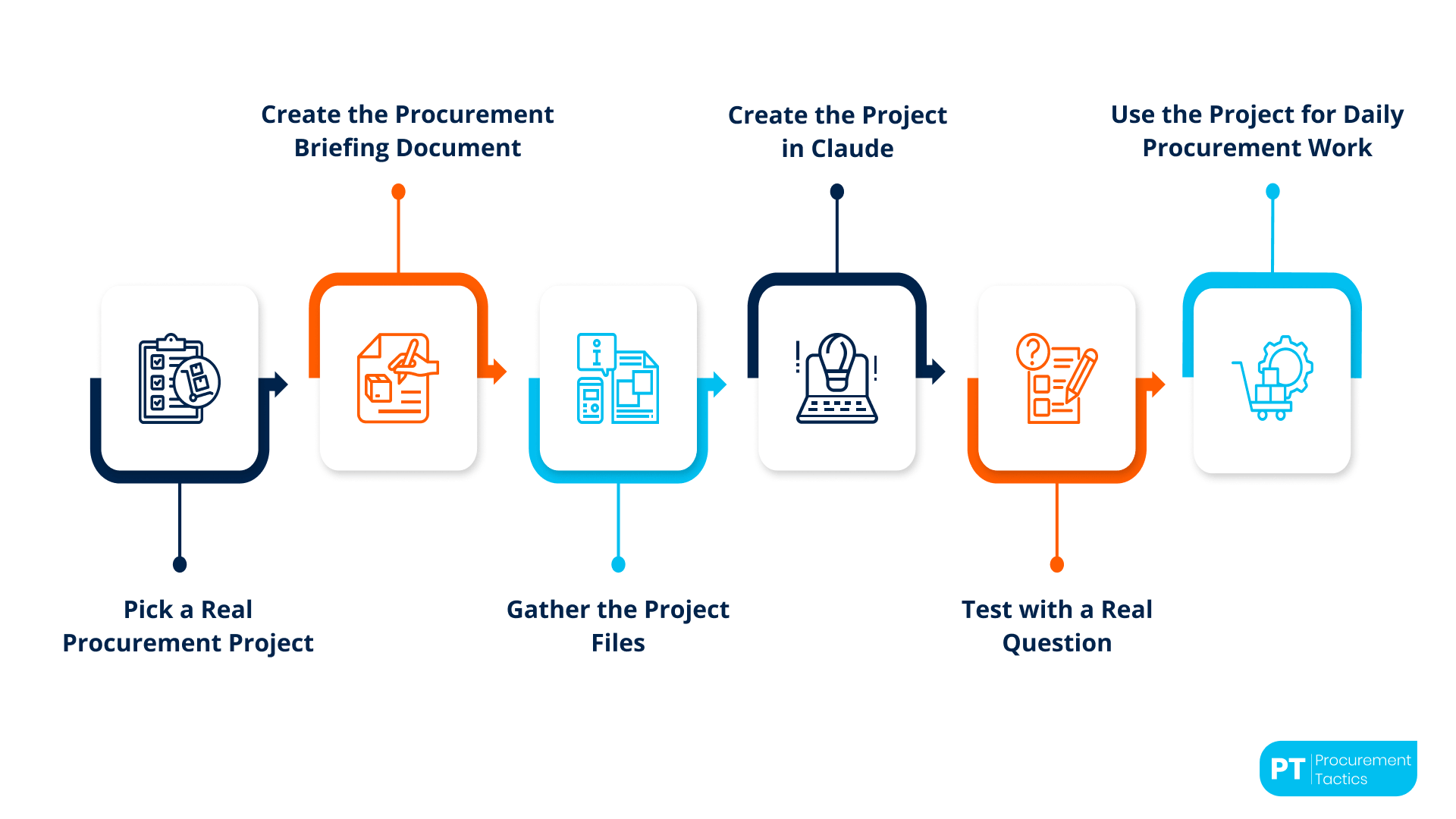
Step 1, Pick a real piece of work, not an experimental one.
The first Project should support the work the procurement professional is actually doing, not a "let me see if Claude can do this" test. A current category the procurement team manages, an upcoming supplier renewal, or an active initiative. The first Project that supports real work pays back within days.
Step 2, Draft the briefing document.
Using the seven-field template. Two or three pages. This is the reusable component, once drafted, it can be copied into every subsequent Project with only field three (category-specific scope) changing.
Step 3, Gather the Project files.
The spend overview for the category. The active supplier list with performance data. The relevant market intelligence. The current contracts. Usually four to six files, nothing more.
Step 4, Create the Project in Claude.
Upload the files. Paste the briefing document content into the custom instructions field (or upload it as a file and reference it in the instructions). Name the Project with a clear convention, "Packaging Category 2026" works better than "Work Stuff".
Step 5, Test with a real question.
Ask Claude a question that should be informed by the Project context. "Given our packaging category profile, what would a reasonable supplier risk assessment look like?" The answer should be specific to the category, not generic. If the answer is generic, the briefing document or the files need adjustment.
Step 6, Use the Project for the next two weeks of real work.
Every time a packaging-related question comes up, ask it inside the Project rather than starting a new chat. The Project compounds context across the two weeks; by the end, the quality of the output is significantly better than the first answer.
After the first Project, each subsequent Project takes five to ten minutes to set up because the briefing document is already written. The procurement team's library of Projects builds quickly once the first one is in place.
For procurement teams rolling Claude out across the function, not just to individual pilot users, the Project setup is usually part of the onboarding. The AI Fundamentals for Procurement Teams program includes the briefing document template and the Project setup sequence as part of its team enablement module.
Governance and Sharing, Who Sees What
Projects scope context, which also means project scope governance. The governance questions are straightforward.
Which Projects are personal and which are shared? On the Claude Team and Enterprise plans, Projects can be shared with other users. Category Projects are usually appropriate to share with the category team. Supplier-specific renewal Projects may be more sensitive, share with the negotiation team, not the whole procurement function. The policy should specify the defaults.
What data is appropriate to upload into a Project? The same governance applied to file sharing in other systems applies here. Confidential commercial terms in a supplier-specific Project are usually appropriate if the plan has the right data-handling terms. Broad commercial information scattered across many Projects is a governance question worth thinking through.
When does a Project retire? Renewal Projects retire when the renewal completes. Initiative Projects retire when the initiative ends. Category Projects are usually long-lived but should be reviewed annually. Stale Projects accumulate outdated context and gradually degrade Claude's output; a regular review prevents this.
Related resource: The Claude Memory Guide, The 10-minute Memory setup for procurement, with the 6-category template and the common pitfalls to avoid.
Related resource: Building Custom Claude Skills for Procurement Teams, The complete playbook for turning procurement SOPs into reusable Claude Skills, SKILL.md anatomy, 5 complete examples, design best practices, rollout approach, and the Skill-chaining pattern.
Conclusion
Claude projects are ultimately less about technology and more about continuity. Procurement work rarely happens in a single conversation or a single day. Supplier negotiations stretch across months, category strategies evolve over quarters, and risk assessments continuously change as markets shift. A project gives procurement teams a way to keep that context together instead of restarting from zero every time work resumes.
That continuity has a practical impact on the quality of procurement work. Instead of spending time repeatedly explaining the same supplier background, category structure, or internal constraints, procurement professionals can focus on higher-value thinking, challenging assumptions, exploring scenarios, and making better commercial decisions. The AI becomes more useful because the procurement team has invested in creating the right environment around it.
The teams seeing the strongest results are not necessarily using more advanced prompts than everyone else. They are simply building better foundations. A well-structured project, a clear briefing document, and consistent use over time create an environment where Claude can support procurement work in a way that feels far more practical and relevant to the realities of the function.
In many ways, projects are what turn Claude from a general AI assistant into something that feels much closer to a procurement analyst working alongside the team every day.
Frequentlyasked questions
What's the difference between a Project and just uploading a file to a Claude chat?
A Project is persistent, files stay, instructions stay, conversation history stays, all scoped to the Project. A one-off chat with an uploaded file is not persistent. For work that continues across multiple sessions, the Project is meaningfully better.
How many Projects should a procurement professional run?
Typically, five to fifteen are active at any time. Below five, the feature is underused. Above twenty, Projects start duplicating each other and become harder to maintain. The exact number depends on the breadth of procurement scope.
Can a whole procurement team share a Project?
On Team and Enterprise plans, yes. Category Projects are usually appropriate to share; supplier-renewal Projects may be more sensitive. The sharing pattern should match the organisation's data governance approach.
Should the briefing document go in custom instructions or as an uploaded file?
Either works. Pasted into custom instructions is slightly more robust, Claude treats it as a primary instruction. Uploaded as a file needs the custom instructions to reference it ('always refer to the uploaded company briefing for context').
What happens to a Project when the underlying files change?
Files in a Project can be updated. The procurement team should refresh key files (spend overview, supplier performance) on the organisation's standard reporting cadence, monthly for most. The Project's conversation history stays intact; subsequent answers reflect the updated files.
Is the briefing document reusable across Projects?
Yes, and should be. Draft it once, use it in every Project with only the category-specific field changing. The briefing document is the highest-leverage artefact a procurement team can produce for Claude; it pays back every time a new Project is created.

About the author
My name is Marijn Overvest, I’m the founder of Procurement Tactics. I have a deep passion for procurement, and I’ve upskilled over 200 procurement teams from all over the world. When I’m not working, I love running and cycling.
