


Written by Marijn Overvest | Reviewed by Sjoerd Goedhart | Fact Checked by Ruud Emonds | Our editorial policy
Guided Buying in Procurement — Definition + How It Works
Table of contents
- What is Guided Buying?
- How Does Guided Buying Work?
- How to Apply Guided Buying in Procurement
- 5 Key Features To Look For Guided Buying
- 7 Difference Between Guided Buying and Spot Buying
- 7 Benefits of Guided Buying
- 5 Guided Buying Challenges and How To Solve Them
- Conclusion
- Frequently asked questions
What is guided buying in procurement?
- Guided buying in procurement is a structured purchasing approach that directs employees to approved suppliers, preferred products, and company-compliant buying channels.
- Guided buying is a procurement process that simplifies purchasing by guiding users toward policy-based decisions, contract-compliant options, and standardized procurement workflows.
- Guided buying in procurement helps organizations control spend, reduce maverick buying, and improve user experience by making approved purchasing choices easier to follow.
What is Guided Buying?
Guided buying is a user-friendly buying approach that helps employees purchase goods and services through one centralized experience while following company rules and approved processes. It is designed to direct users toward preferred suppliers, approved catalogs, and compliant buying channels instead of leaving them to search and buy on their own. In practice, guided buying combines ease of use with better control, so organizations can make buying requests simpler without losing visibility or consistency.
This approach is especially valuable because it reduces off-contract buying, improves compliance, and creates a better user experience for employees. Many guided buying solutions also support smarter decision-making by showing recommended suppliers, relevant buying options, and step-by-step guidance during the process. As a result, guided buying is often seen as an important part of digital buying because it connects convenience, standardization, and control in one process.
How Does Guided Buying Work?
Guided buying works differently across procurement platforms, but in each case it is designed to direct users toward approved suppliers, compliant purchasing paths, and more efficient buying decisions.
1. SAP Ariba
In SAP Ariba guided buying, the process usually starts when a user enters one central self-service procurement portal designed especially for occasional buyers and employees outside the core procurement team. On the homepage, users see persona-based tiles, categories, forms, and permissions, so they are immediately shown only the options that match their role, location, and purchasing needs. The next step is searching for a product or service through a simple, consumer-like interface, where the system directs users toward approved catalogs, preferred suppliers, and the right buying channels. If needed, SAP Ariba can also connect the user with a category expert or related sourcing and supplier collaboration tools.
Once the user starts creating a request, SAP Ariba moves to the next step by checking policies, rules, and compliance requirements in real time. If a purchase does not fit company policy, the system can display warnings, block the action, or recommend compliant alternatives. After that, the request follows the correct workflow, which may include automatic approval for simple purchases or a more formal approval path for more complex requests. In this way, SAP Ariba guides users step by step, so they do not need to know every procurement rule in advance because the platform embeds those rules directly into the buying journey.
2. Coupa
In Coupa, guided buying works by giving users access to one unified procure-to-pay environment that combines guided buying, automated workflows, and spend visibility. The first step is that the user searches for what they need through catalogs, hosted catalogs, punchouts, or other purchasing channels available in the platform. Then the system guides the user toward standardized and approved purchasing options, helping them stay within contracted suppliers and compliant buying paths. This means guided buying in Coupa is not only about shopping, but also about making sure requests begin inside a controlled digital procurement process.
After the request is submitted, Coupa moves into the next step by using automated workflow routing and approval logic. Public product information shows that Coupa helps organizations speed up approvals and connect requisitions with purchase orders and supplier-side processes in one flow. Once approved, the request can continue into purchase order processing, supplier collaboration, and invoicing, while the user and procurement team maintain visibility over the transaction. In practice, guided buying in Coupa follows a clear path: the user searches through approved channels, the system routes the request to the right approvers, and the process continues into purchasing and invoicing within the same ecosystem.
3. Zip
In Zip, guided buying starts from what the company describes as an AI-powered front door for procurement and spend requests. The first step is not always catalog shopping, but rather submitting a structured intake request where the employee explains what they want to buy, why it is needed, and which teams may need to be involved. The next step is that Zip uses its intake management, workflow engine, and AI procurement capabilities to recognize the request type and send it into the correct process. Because of that, guided buying in Zip works more like guided request orchestration than a traditional catalog-only buying flow.
After the intake step, Zip moves the request through connected functions such as supplier onboarding, sourcing, risk orchestration, procure-to-pay, and spend visibility. This means the system automatically routes the request to the right teams, approvers, and downstream systems instead of making employees figure out the process on their own. The platform also keeps visibility over the full request lifecycle, so users can track progress while procurement keeps control and compliance. In practice, guided buying in Zip works as a sequence of steps: the employee enters through one portal, submits a structured request, Zip identifies the right path, and the request moves through approval and execution in a controlled way.
4. GEP SMART
In GEP SMART, guided buying is designed to help users move through the right buying channels and large volumes of procurement content without leaving the approved process. The first step is product or service discovery through the portal and catalog environment, where GEP states that guided buying directs users toward preferred, category-specific buying channels. The next step is selecting from pre-approved catalogs or supplier catalogs, which helps keep purchases aligned with negotiated supplier relationships and company rules. In this way, GEP SMART reduces off-contract spending by guiding users toward the right option from the beginning.
Once the user makes a selection, GEP SMART moves into the next stage through approval workflows, catalog governance, and procure-to-pay functions. GEP’s product materials describe configurable approval workflows, which means requests can be routed automatically to the right stakeholders without manual handoffs. After approval, the process continues through the wider procure-to-pay flow, from requisition to purchase order and invoice handling. So, guided buying in GEP SMART follows a practical sequence: search through the approved channel, choose from compliant catalogs, send the request through workflow-based approval, and keep the spend within controlled procurement rules.

5. JAGGAER One
In JAGGAER One, guided buying works through a one-stop shopping experience where users can search and compare items from hosted catalogs, inventory, and punchouts in one place. The first step is centralized search, which brings different sources of procurement content into a single interface and reduces the need to leave the platform or search for suppliers manually. The next step is guiding users toward policy-compliant purchases through dashboards, guided buying logic, and connected supplier content. JAGGAER also links this experience with its supplier network, making approved supplier options easier to access and use.
Once the user builds a requisition or selects an item, JAGGAER One continues through configurable workflows and approvals. Its product materials explain that workflows can automate the process from requisition to purchase order and change requests, while also supporting real-time budget checks, routing, and approvals. After approval, the request can continue into eProcurement, invoicing, and payment processes, while upstream tools such as contract management help maintain compliance with negotiated terms. As a result, guided buying in JAGGAER One follows a clear sequence: the user searches in one shopping environment, selects from catalogs and punchouts, the system checks budget and policy alignment, and the request moves automatically into approval and purchase order processing.
How to Apply Guided Buying in Procurement
If you want to enhance your procurement process with it, there are a few simple best practices to consider when setting up a new system.
Here's a step-by-step guide to help you get started:
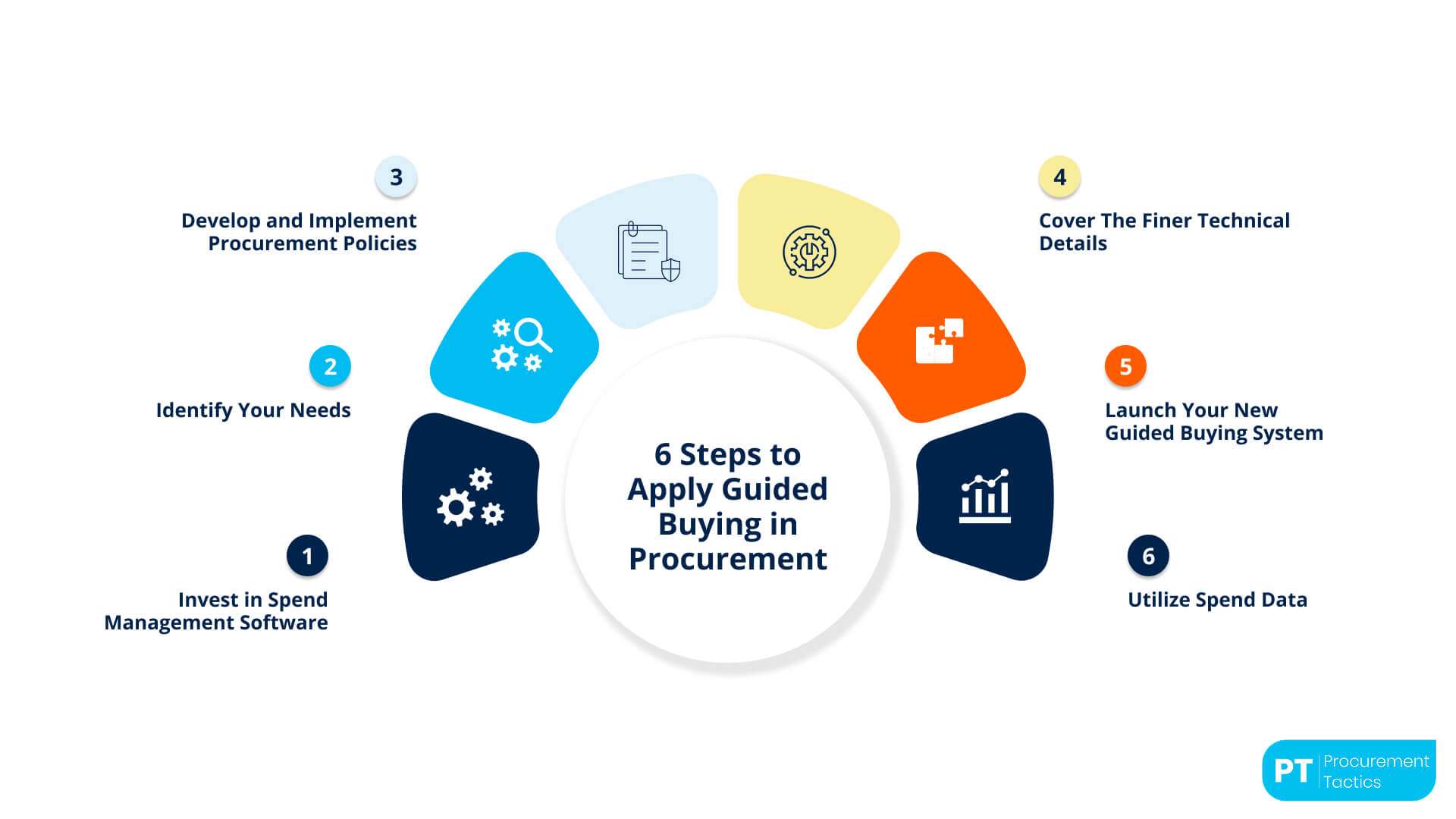
1. Invest in Spend Management Software
The first step is to invest in spend management software that can support guided buying in a structured and efficient way. The system should provide features such as approved buying paths, supplier catalog access, user permissions, and workflow automation. These functions help create a centralized and controlled buying environment.
This type of software makes the buying process easier for employees and more manageable for the organization. It improves visibility across requests, approvals, and transactions while reducing manual work. It also creates a stronger foundation for digital buying and better spend control.
2. Identify Your Needs
Before implementing guided buying, the organization should clearly identify the goods and services it purchases most often. This includes both direct and indirect buying needs, along with the most relevant categories and suppliers. A clear understanding of demand helps build a system that matches actual business requirements.
At this stage, it is also important to define user roles, budgets, and approval requirements. Companies should decide which suppliers are preferred and which categories need closer control. This preparation makes the guided buying process more accurate, useful, and aligned with organizational goals.
3. Develop and Implement Policies
After identifying business needs, the next step is to develop clear buying policies and procedures. These policies should define who can buy, what can be purchased, when approval is needed, and how exceptions should be handled. Clear rules help create consistency across the buying process.
Well-structured policies make guided buying easier to manage and easier for users to follow. They support compliance by directing employees toward approved options and standard steps. They also help reduce off-contract buying and improve purchasing discipline.
4. Cover the Technical Details
Once the policies and structure are defined, the technical setup of the system becomes very important. This step includes supplier integration, catalog setup, search functionality, and user-friendly interface design. The goal is to make the system simple, accessible, and easy to navigate.
The technical design should support a smooth buying experience from the first search to the final approval. Employees should be able to find the right products or services quickly and with minimal confusion. A strong technical setup increases usability, improves efficiency, and supports long-term adoption.
5. Launch the Guided Buying System
When the system is ready, it should be launched through a clear and organized rollout process. Employees need to understand how the system works, why it is being introduced, and what benefits it offers. Internal communication plays an important role in building awareness and acceptance.
Training is also essential during this stage because users need confidence in the new process. Support materials, reminders, and clear instructions can help employees adjust more easily. A well-managed launch increases adoption and encourages more consistent system use.
6. Use Spend Data
After the system is launched, it will begin collecting valuable spend data from daily buying activities. This data can reveal spending patterns, supplier usage, compliance levels, and possible savings opportunities. It gives the organization a stronger basis for monitoring and improving buying performance.
Companies can use this information to negotiate better terms, improve supplier decisions, and refine internal buying strategies. Spend data also helps identify inefficiencies and areas where additional control may be needed. Over time, it supports smarter decisions and makes guided buying more effective and strategic.
5 Key Features To Look For Guided Buying
When choosing a guided buying solution, it is important to focus on features that improve user experience, strengthen control, and support better buying decisions.
1. Centralized Search and Easy User Experience
A guided buying solution should provide one simple place where users can search for goods and services quickly and easily. The system should be intuitive, clear, and easy to navigate so employees can find approved options without confusion. A strong user experience increases adoption and helps users follow the correct buying process.
2. Preferred Supplier and Catalog Guidance
The platform should guide users toward preferred suppliers, approved catalogs, and contract-based options during the buying process. This helps employees make better choices without needing deep procurement knowledge or extra support. As a result, the organization can improve compliance and reduce off-contract buying.
3. Workflow Automation and Approval Routing
A good guided buying tool should include automated workflows for request submission, approval routing, and status tracking. This makes the process faster and ensures that each request reaches the right person at the right time. Automation also reduces manual work and improves consistency across the organization.
4. Integration with Existing Systems
The system should integrate well with supplier catalogs, internal platforms, and other purchasing or finance tools already used by the organization. Strong integration helps create a smoother process from request to order and payment. It also improves data accuracy and makes the system more useful in daily operations.
5. Spend Visibility and Data Insights
A guided buying solution should provide clear visibility into spending activity, user behavior, and purchasing patterns. This allows organizations to monitor compliance, identify savings opportunities, and improve buying decisions over time. Better data insights make guided buying more effective, strategic, and valuable for long-term control.
7 Difference Between Guided Buying and Spot Buying
7 Benefits of Guided Buying
5 Guided Buying Challenges and How To Solve Them
Conclusion
Guided buying represents an important step in improving procurement because it combines a user-friendly buying experience with stronger control, compliance, and visibility. By guiding employees toward approved suppliers, catalogs, and workflows, it helps reduce off-contract buying, simplify requests, and support more consistent decision-making across the procurement process. Its value becomes even greater when it is supported by the right technology, clear policies, strong integration, and reliable spend data.
At the same time, successful guided buying does not depend only on software, but also on user adoption, supplier integration, data quality, and well-designed approval processes. Organizations that address these areas can build a more efficient procurement environment, improve spending transparency, and strengthen long-term spend control. Overall, guided buying can be seen as a practical and strategic approach that helps companies make purchasing easier, smarter, and more aligned with business goals.
Frequentlyasked questions
What is guided buying in procurement?
Guided buying in procurement is a structured purchasing approach that helps employees buy through approved suppliers, catalogs, and workflows while following company policies.
How does guided buying work?
Guided buying works by directing users through a centralized system that shows approved options, applies rules and approvals, and supports a more controlled buying process.
What is the difference between guided buying and spot buying?
The main difference is that guided buying is structured and policy-driven for approved purchasing, while spot buying is used for unplanned or immediate purchases, often outside standard contracts.
About the author
My name is Marijn Overvest, I’m the founder of Procurement Tactics. I have a deep passion for procurement, and I’ve upskilled over 200 procurement teams from all over the world. When I’m not working, I love running and cycling.
