


Written by Marijn Overvest | Reviewed by Sjoerd Goedhart | Fact Checked by Ruud Emonds | Our editorial policy
Mobile Procurement — Definition, Steps + Examples
- Mobile procurement refers to managing and approving purchasing activities through mobile devices, allowing teams to handle requisitions, supplier communication, and approvals anytime, anywhere.
- Mobile procurement boosts flexibility, speeds up approval cycles, and increases real-time visibility across the entire procurement process, making operations more agile and responsive.
- While security and system integration remain key concerns, adopting the right mobile tools, training users, and setting clear governance policies ensures smooth implementation and measurable ROI.
What is Mobile Procurement?
Mobile procurement is the process of managing and approving purchasing activities through mobile devices. It enables teams to create requests, review suppliers, and finalize orders directly from their smartphones or tablets, making the entire buying process faster and more accessible.
In simple terms, it’s the extension of your procurement system to your smartphone or tablet. It connects employees, managers, and suppliers in real time, without being tied to a desk.
Mobile procurement is powered by cloud-based platforms that sync automatically with existing ERP or P2P systems. Every approval, update, or order is recorded instantly across the organization. That means fewer delays, better collaboration, and complete visibility into what’s being purchased and why.
Mobile procurement isn’t a separate process; it’s the next evolution of e-procurement. It combines the power of mobility, cloud connectivity, and automation to make procurement faster, smarter, and more transparent.
The 7 Steps of the Mobile Procurement Process
Mobile procurement follows the same seven steps as our standard process, but adapts how and when work happens because it’s done through mobile devices. The workflow doesn’t change in substance; mobility simply makes each step faster, real-time, and accessible from anywhere.
Now, here’s how each step works on mobile.
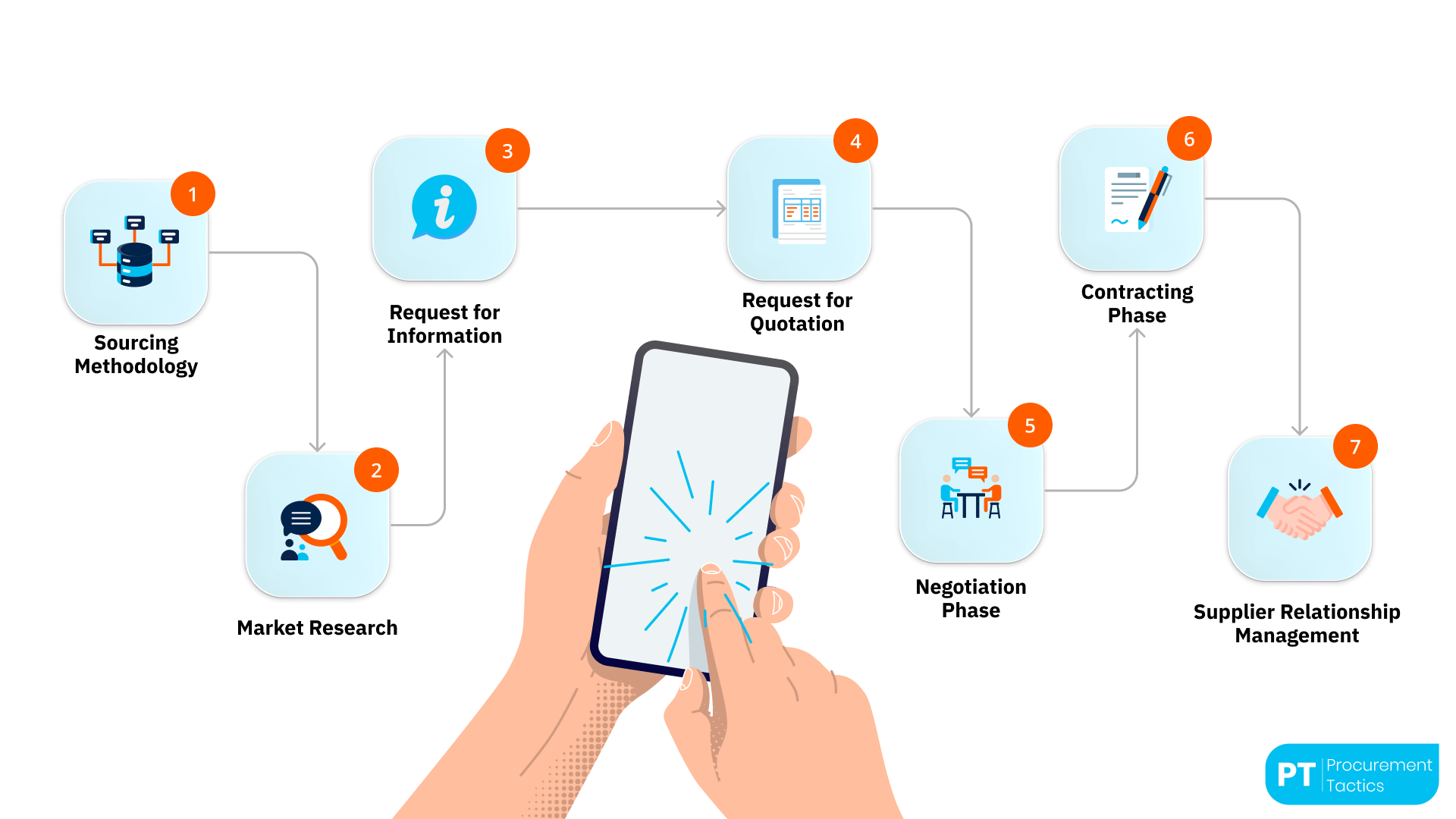
1. Sourcing Methodology
Mobile procurement begins by giving buyers and stakeholders real-time access to sourcing data wherever they are. Instead of preparing sourcing strategies only from the office, teams can use mobile dashboards to analyze categories, supplier lists, and spend data directly in the field. This ensures decisions are made faster and remain aligned with organizational priorities.
Example:
A category manager reviewing supplier performance during a site visit can use their phone to check contract KPIs and identify which suppliers are underperforming before scheduling follow-up meetings.
2. Market Research
Through mobile platforms, procurement professionals can instantly research markets, compare suppliers, and view price benchmarks. Apps often integrate live supplier databases or sustainability scores, allowing category managers to assess options while traveling or on-site. This speeds up early research and ensures access to the latest supplier information.
Example:
While traveling, a sourcing specialist uses the app to filter suppliers by region and ESG score, quickly identifying which vendors meet the company’s sustainability requirements before sending an inquiry.
3. Request for Information (RFI)
Mobile tools simplify sending and receiving RFIs. Buyers can draft RFI templates, send them through mobile apps, and receive responses in real time. Push notifications alert users when suppliers reply, enabling faster evaluation and quicker shortlisting.
Example:
A buyer in the field receives supplier details and technical specs on their tablet, reviews them between meetings, and shortlists qualified vendors on the spot, cutting what used to take days down to hours.
4. Request for Quotation (RFQ)
Once suitable suppliers are identified, the RFQ process can happen entirely on mobile. Procurement managers compare offers side by side on their device, review delivery terms, and approve or reject bids instantly. This flexibility shortens the RFQ cycle and helps maintain project momentum.
Example:
A project manager receives three quotes in the mobile app, checks price and lead time, and immediately forwards the top bid for director approval, all while on a client visit.
5. Negotiation Phase
Mobile procurement platforms support digital negotiation rooms or chat functions where buyers and suppliers can clarify terms in real time. Documents, revised quotes, and updated conditions are instantly visible to all parties. Even during travel or site visits, negotiators can respond immediately, reducing delays and improving transparency.
Example:
During travel, a procurement lead uses a built-in chat to renegotiate delivery dates, while updated versions of price sheets appear instantly for both sides to review. This keeps negotiations moving without waiting for email replies.
6. Contracting Phase
With e-signature integrations, contracts can be reviewed and approved directly on mobile. Procurement and legal teams can access shared versions, leave comments, and sign documents securely. This mobility keeps projects moving, especially when cross-functional approvals are needed quickly.

Example:
A contract manager receives a notification, opens the updated agreement on their phone, and signs it using two-factor authentication. The supplier is instantly notified, allowing the project to start immediately.
7. Supplier Relationship Management (SRM)
After contracting, mobile tools continue to add value. They enable buyers to track delivery, quality, and performance indicators from anywhere. Field teams can submit supplier feedback or incident reports directly through mobile apps, ensuring real-time monitoring and stronger supplier relationships.
Example:
A warehouse supervisor logs a delayed delivery through the app, which automatically alerts the supplier and procurement lead. The issue is resolved in real time, avoiding future delays.
Real-World Examples of Mobile Procurement
Mobile procurement is no longer a futuristic concept; it’s already reshaping how global and mid-sized companies manage their purchasing workflows. Here are three real cases that show what happens when procurement goes mobile:
Example 1: Coupa & SAP Ariba Mobile Apps
What they do:
Global enterprises using Coupa and SAP Ariba discovered that long approval cycles and limited desktop access were delaying projects and supplier payments.
Managers often traveled or worked remotely and couldn’t review purchase requests or budgets efficiently.
To address this, these organizations introduced mobile extensions of their existing procurement platforms, giving decision-makers full control of purchasing activities directly from smartphones and tablets.
How It Works:
Both companies implemented secure, cloud-based mobile applications fully integrated with their ERP systems. All core functions, requisition creation, purchase-order approval, and supplier communication, were optimized for mobile use.
Real-time push notifications, biometric log-ins, and single sign-on authentication ensured speed and security. Managers can now approve requests, compare supplier quotes, and track spending while away from their desks.
To support adoption, in-app guides and short video tutorials showed users how to complete approvals in under a minute.
Why It’s Effective:
- Approval cycle times dropped from several days to just minutes.
- Real-time dashboards improved visibility across global operations.
- Automation reduced manual follow-ups and data errors, improving compliance and supplier responsiveness.
Example 2: “Mega Company” — Digital PO App for Field Procurement
What they do:
A global industrial manufacturer faced frequent purchase-order delays due to paper-based workflows and spreadsheet approvals.
Field engineers working on remote project sites often had to return to their offices just to create or authorize small purchase requests.
To eliminate these bottlenecks, the company’s IT and procurement teams co-developed a no-code mobile application that digitized and simplified the entire PO process.
How It Works:
The new mobile app was directly connected to the company’s existing e-procurement platform, allowing all purchase activities to occur in one system.
Routine tasks, supplier selection, order validation, and budget confirmation were automated. Users could attach photos, technical specs, or receipts, create requests offline, and sync them automatically when back online.
Instant alerts notified managers of pending approvals, ensuring that every PO reached the right person in real time.
Why It’s Effective:
- Approval times fell by more than 50%.
- Policy breaches were flagged instantly, ensuring compliance.
- Field teams could make quick, on-site purchases, keeping production and maintenance uninterrupted.
Example 3: Green Cell — From Spreadsheets to Mobile Procurement
What they do:
Green Cell, a fast-growing Polish company specializing in electromobility and consumer electronics, faced increasing inefficiencies as its procurement volume expanded.
For years, all purchasing was managed through Google Sheets and long email chains, a process that became unmanageable as the company grew to more than 300 employees and processed around 600 orders per month.
To regain control, improve speed, and reduce manual errors, Green Cell adopted a cloud-based procurement platform with full mobile functionality powered by Precoro.
How It Works:
The procurement team migrated all purchasing activities into a single centralized system. Employees now submit purchase requests directly through a mobile app, while managers approve them in real time.
Integration with finance systems provides immediate visibility into budgets, spend categories, and supplier performance. Short training sessions and user-friendly interfaces helped staff quickly transition from spreadsheets to the new mobile process, ensuring adoption across departments.
Why It’s Effective:
- Manual data entry and spreadsheet errors were eliminated.
- Approval times shortened significantly, improving operational flow.
- Managers gained real-time budget visibility, and supplier collaboration became faster and more transparent.
Benefits of Mobile Procurement
Below are the key benefits that make mobile procurement a game-changer for modern organizations.
Challenges of Mobile Procurement
Even though mobile procurement brings speed and flexibility, it’s not without its challenges. Security, integration, and user adoption can quickly become obstacles if they’re not managed from the start.
Here’s a quick overview of the most common issues, and how leading procurement teams solve them in practice:
6 Best Practices for Implementing Mobile Procurement
Here are six best practices to guide your rollout of mobile procurement.
1. Assess Your Needs First
Before you choose a tool, understand what problems you’re solving. Are approvals too slow? Do remote teams struggle with access? Or is visibility the issue?
Mapping your current pain points will help you define clear goals for mobile procurement. Interview end-users and managers; the best insights come from the people who use the process daily.
How to do it:
- Map your current procurement workflow, from requisition to payment, and measure how long each step takes.
- Identify where delays happen and which steps depend on desktop access.
- Survey frequent users (requesters, approvers, and finance) to ask what slows them down most.
- Turn findings into 2–3 measurable goals, such as “reduce approval time by 40%” or “enable field approvals within one day.”
2. Select the Right Platform
Not every e-procurement system has a strong mobile version. Look for platforms that are mobile-first, cloud-based, and easy to integrate with your ERP or finance system. Prioritize security features (like MFA and encryption) and a clean user interface.
How to do it:
- Make a checklist of non-negotiable features: mobile-first design, strong security (MFA, encryption), offline access, and API integration.
- Request live demos specifically on mobile devices, not desktops.
- Test how the app syncs with your ERP or P2P system in real time.
- Involve both procurement and IT early to confirm compatibility and data security standards.
3. Start with a Pilot Program
Don’t roll it out to everyone at once. Begin with one department or category, test how the mobile process performs in real conditions.
Collect feedback, fix issues, and fine-tune workflows before company-wide adoption. Pilots build internal champions who can advocate for the tool later.
How to do it:
- Choose one category or department (for example, marketing, maintenance, or logistics).
- Run the pilot for 6–8 weeks with clear KPIs like “number of mobile approvals” or “average cycle time.”
- Collect feedback weekly from both users and approvers.
- Use results to fine-tune workflows and prepare a phased rollout plan for other teams.
4. Train and Communicate Clearly
Mobile procurement may be intuitive, but training still matters. Show users how the app saves time, reduces paperwork, and improves visibility.
Keep sessions short, visual, and focused on real-life examples. Create a 5-minute video tutorial and pin it to your intranet or chat tool.
How to do it:
- Create a simple step-by-step guide or short video showing how to create, approve, and track a request via mobile.
- Host quick 15-minute demo sessions for remote teams.
- Highlight time savings, for example, “approve in 60 seconds”, to motivate adoption.
- Add an FAQ or chatbot inside the app so users can get help instantly.
5. Strengthen Governance and Security
Speed is great, but governance is essential. Define who can approve what, set spending limits, and use automated alerts for policy exceptions.
Make sure all transactions are logged for full traceability. Combine mobile agility with solid oversight; that’s what builds long-term trust.
How to do it:
- Define approval limits and workflows directly inside the mobile system.
- Implement mobile device management (MDM) to secure access, enforce screen locks, and enable remote wipe.
- Configure automated alerts for high-value purchases or unusual spending.
- Review audit logs monthly to ensure compliance and traceability.
6. Monitor, Measure, and Improve
After launch, track how mobile procurement performs. Use KPIs like approval time, user adoption rate, and cost per transaction to measure impact. Continuous monitoring helps you spot new opportunities for optimization.
How to do it:
- Track KPIs such as approval cycle time, mobile adoption rate, and transaction accuracy.
- Create a dashboard that updates these metrics weekly.
- Hold monthly review meetings between procurement and IT to discuss findings.
- Adjust workflows, notifications, or training materials based on user feedback.
Conclusion
Mobile procurement is changing how modern teams work. It makes approvals faster, communication smoother, and decisions easier, all without being tied to a desk.
Yes, it brings new challenges like security and integration, but with the right tools and training, those are easy to manage. Real-world examples show that mobility and control can coexist, and that the payoff is speed, accuracy, and transparency.
Procurement is no longer just digital; it’s mobile. The organizations that adapt now will stay one step ahead tomorrow.
Frequentlyasked questions
What is mobile procurement?
Mobile procurement means managing purchasing activities through smartphones or tablets. It allows users to create requests, approve purchases, and track orders anytime, anywhere, without being tied to a desk.
Is mobile procurement secure?
Yes. Most modern platforms use advanced encryption, multi-factor authentication, and device management tools to keep data safe. Security is built into the process from the start.
Which industries benefit most from mobile procurement?
Any business with field teams or remote operations, such as construction, logistics, manufacturing, or energy, gains speed, visibility, and control through mobile access.
About the author
My name is Marijn Overvest, I’m the founder of Procurement Tactics. I have a deep passion for procurement, and I’ve upskilled over 200 procurement teams from all over the world. When I’m not working, I love running and cycling.