

Written by Marijn Overvest | Reviewed by Sjoerd Goedhart | Fact Checked by Ruud Emonds | Our editorial policy
Purchase Order Automation: Definition, Benefits + Limitations
What is purchase order automation?
- Purchase order automation replaces manual paperwork with digital workflows, reducing delays, errors, and administrative overhead.
- Purchase order automation enhances transparency and control across procurement and finance, ensuring every purchase request follows an approved, trackable process.
- However, automation requires accurate data, system integration, and user adoption. Without these, even the best tools can fail to deliver results.
What is Purchase Order Automation?
Purchase order automation is the process of using digital tools to create, approve, send, and track purchase orders without manual intervention. Instead of filling out forms, sending emails, or updating spreadsheets, an automated system does the heavy lifting for you.
The software automatically routes purchase requests to the right approvers, converts approved requests into purchase orders, and sends them directly to suppliers. It also updates records in real time, ensuring full visibility from request to delivery.
In traditional procurement, every PO step, from approval request, can take hours or days. With automation, it happens in minutes. This speed not only saves time but also prevents errors, duplicate orders, and maverick spending.
Modern automation platforms, such as those from IBM, GEP, and Tipalti, integrate seamlessly with ERP and accounting systems. That means procurement and finance teams work from the same data source, improving accuracy and compliance.
How to Automate Purchase Orders in 6 Steps
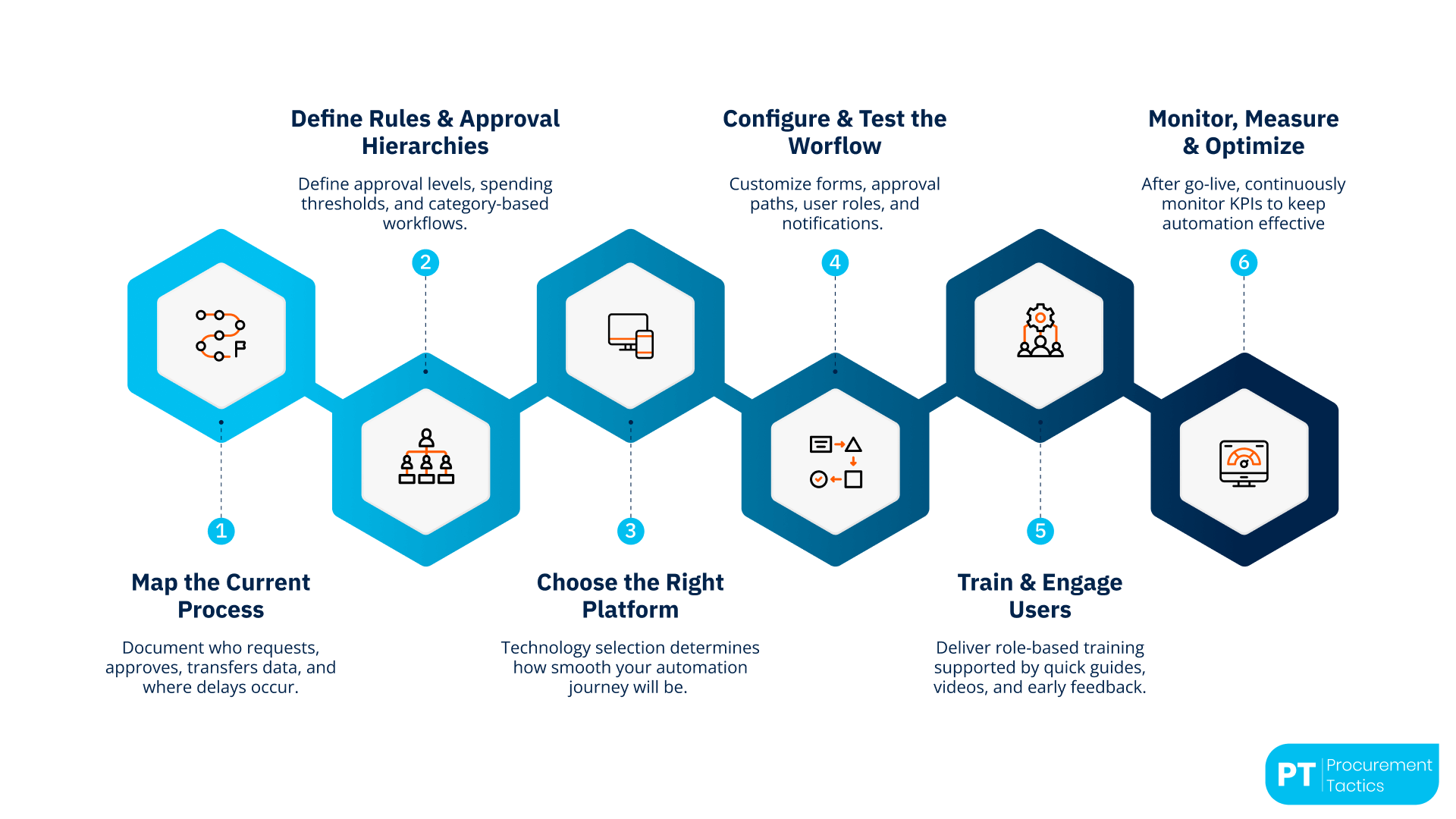
A successful implementation blends technology, governance, and people. Below is a structured roadmap to get it right.
1. Map the Current Process
Before you can automate, you need to understand how things work today. Document every step, who creates purchase requests, who approves them, how data is transferred, and where delays occur. This mapping will highlight redundant steps, duplicated approvals, and communication gaps that automation can eliminate.
Many organizations discover that 30–40% of approval time is lost simply because requests sit in email inboxes. Visualizing the current process helps you redesign it into a faster, standardized workflow.
2. Define Rules and Approval Hierarchies
Automation only works when rules are clear. Define approval levels, spending thresholds, and category-based workflows. For example, marketing purchases below $1,000 might auto-approve, while IT equipment above that limit requires department-head and finance approval.
Establishing these “if-then” conditions ensures that the software automatically routes each request to the correct approver, reducing bottlenecks and ensuring compliance. This step is also where procurement and finance alignment is crucial, both must agree on how budget control is embedded in the system.
3. Choose the Right Platform
Technology selection determines how smooth your automation journey will be. Look for tools that integrate easily with your ERP, accounting, or supplier management system. Platforms like GEP SMART™, IBM Emptoris, or Tipalti are designed for complex procurement environments, offering:
- Cloud deployment for scalability.
- Pre-built integrations with SAP, Oracle, or NetSuite.
- Configurable approval workflows and strong data-security standards.
For smaller companies, lightweight tools like Monday.com or ProcureDesk can automate basic approval flows without heavy IT infrastructure. The key is compatibility; automation should connect with your existing ecosystem, not create another silo.
4. Configure and Test the Workflow
Once the platform is chosen, the configuration phase begins. Here, you customize forms, approval paths, user roles, and notifications. Work with your IT or implementation partner to ensure each step mirrors your business logic.
Pilot testing is essential. Start with one department or one spend category (for example, marketing materials or office supplies). Measure cycle time, accuracy, and user satisfaction before scaling up. IBM and GEP both highlight that early pilot projects often expose overlooked approval gaps or duplicate data sources, issues that are much cheaper to fix before full rollout.
5. Train and Engage Users
Even the most advanced system will fail if employees don’t use it correctly. Change management is the human side of automation. Communicate why the change is happening and how it benefits users.
Offer short, role-based training sessions for requisitioners, approvers, and procurement managers. Create simple user guides and quick-reference videos. Encourage feedback during the first few weeks; it helps fine-tune the process and builds ownership.
Organizations that involve users early see up to 60% higher adoption rates, according to GEP’s internal benchmark studies.
6. Monitor, Measure, and Optimize
After go-live, continuous monitoring keeps automation effective. Track KPIs such as:

- Cycle time — average time from request to PO creation.
- PO accuracy — rate of POs that match invoices without manual correction.
- Cost per transaction — total administrative cost of creating one PO.
- User adoption rate — percentage of requests processed through the system versus outside it.
Use dashboards and reports to identify areas for improvement. For instance, if approval time remains high, you may need to adjust thresholds or remove unnecessary reviewers.
Regular optimization ensures that automation evolves with your business needs rather than becoming outdated over time.
When executed properly, PO automation transforms procurement from a reactive administrative function into a strategic, data-driven process. It speeds up approvals, increases accuracy, and frees teams to focus on value-added tasks such as supplier development and cost optimization, exactly what modern procurement is meant to achieve.
Case Studies: Automation in Action
1. IBM: Streamlining Global Purchase Orders
What they did:
IBM decided to fully automate its purchase order operations as part of a wider digital transformation across procurement and finance. Before automation, each business unit used its own templates, approval chains, and communication channels. This created inconsistent data, slow approvals, and limited visibility into global spend.
How it works:
IBM implemented an integrated PO automation system that connects purchase requests, approvals, and supplier management in one digital workflow.
When an employee submits a purchase request, the system instantly checks budget limits, routes the request to the right approver, and generates a purchase order once approved. The order is sent directly to the supplier and recorded in the ERP system in real time.
Why it’s effective:
The results were dramatic. The company achieved over 90% automation of PO creation across more than 70 countries.
Approval times fell from several days to less than 24 hours, while documentation errors dropped by 80%.
Procurement teams gained global visibility into spend data, enabling IBM to negotiate better supplier terms and reduce operational costs significantly.
2. Tipalti: Automation for Fast-Growing Tech Companies
What they do:
Tipalti worked with high-growth tech firms such as Canva, Twitch, and Amazon Games to automate their purchase order, invoicing, and payment processes. These companies were scaling rapidly, and manual approval chains were slowing down procurement and creating payment delays.
How it works:
Tipalti’s cloud platform unified the entire “purchase-to-pay” cycle. Once a PO is approved, it’s automatically matched with corresponding invoices and receipts.
The system ensures that only verified and budget-approved transactions are processed for payment. It also creates a complete audit trail, every action is logged and accessible for compliance checks.
Why it’s effective:
Automation reduced administrative workload and processing costs by up to 40%. Finance teams closed monthly books faster and with fewer reconciliation errors.
At the same time, supplier satisfaction improved thanks to faster payments and clearer communication. The companies also strengthened compliance, which is critical for investor transparency and audit readiness.
3. GEP: Retail Procurement Transformation
What they do:
A large European retail chain partnered with GEP to centralize its procurement operations. Before automation, every store location handled purchase orders independently through spreadsheets and emails, leading to duplicate orders, slow approvals, and weak spend control.
How it works:
Using the GEP SMART™ platform, the retailer introduced a standardized purchase order system across all branches.
Each purchase request is now entered through a single interface that applies automated approval rules based on order type, category, and value.
Real-time dashboards allow procurement managers to monitor open orders, budgets, and supplier performance.
Why it’s effective:
The automation cut approval time from three days to just a few hours and reduced manual rework by 60%.
The company now benefits from unified data visibility across its branches, stronger compliance with procurement policies, and the ability to negotiate better terms with suppliers based on consolidated spend insights.
4. Monday.com: Simplifying Procurement for SMEs
What they do:
Small and mid-sized companies adopted Monday.com to digitize and automate their internal purchase order workflows. Many of these organizations lacked dedicated procurement systems and relied on manual requests sent via email.
How it works:
Monday.com’s workflow automation lets employees submit purchase requests through dynamic forms.
The platform automatically assigns approvers, updates PO statuses, and sends alerts when budgets are exceeded or when supplier responses are delayed.
It also stores all documentation in a central location, accessible to procurement and finance teams.
Why it’s effective:
These companies saw a 50% reduction in PO approval time and a noticeable improvement in collaboration between departments.
Automated alerts and dashboards eliminated confusion around “who approved what,” while finance gained real-time visibility into pending commitments.
The simplicity of Monday.com made automation accessible even to small teams without advanced IT support.
Purchase Order Automation: Benefits and Limitations
Automating purchase orders brings clear operational and strategic value, but it also comes with practical challenges.
The table below summarizes the key benefits and limitations that companies should consider when planning or enhancing their automation journey.
Conclusion
Purchase order automation is no longer a tech upgrade; it’s a core business capability.
By digitizing and streamlining procurement workflows, organizations gain speed, accuracy, and full visibility across every purchase.
Success, however, depends on more than software. It requires clean data, clear governance, and engaged employees. Companies like IBM, Tipalti, and GEP show that when these foundations align, automation drives innovation, not just efficiency.
Ultimately, purchase order automation gives companies control over time, costs, and compliance, transforming procurement from a transactional task into a true value-creating function.
Frequentlyasked questions
What is Purchase Order Automation?
Purchase order automation is the use of digital tools to create, approve, send, and track purchase orders without manual effort. It replaces paper forms and email threads with automated workflows that connect procurement and finance, ensuring every order follows a clear, auditable process.
Is purchase order automation suitable for small businesses?
Yes. Cloud-based tools like Monday.com or ProcureDesk are affordable and easy to implement, making automation accessible even to smaller procurement teams.
How long does implementation take?
Implementation time depends on process complexity and data readiness. Small businesses can automate within a few weeks, while enterprise-level rollouts involving ERP integration may take several months.
About the author
My name is Marijn Overvest, I’m the founder of Procurement Tactics. I have a deep passion for procurement, and I’ve upskilled over 200 procurement teams from all over the world. When I’m not working, I love running and cycling.