

Written by Marijn Overvest | Reviewed by Sjoerd Goedhart | Fact Checked by Ruud Emonds | Our editorial policy
AI Security in Procurement — Definition + Checklist

As taught in the AI Implementation Course For Procurement Directors / ★★★★★ 4.9 rating
What is AI security in procurement?
- AI security in procurement requires guardrails that control how AI tools handle data. These guardrails ensure supplier and contract information remains protected.
- Every AI tool must be audited for storage, training, access, and compliance. Tools that fail to meet policy or legal standards must be blocked.
- People are central to security. Clear rules, training, restricted access, and continuous monitoring reduce the risk of human error and data leaks.
What is AI Security in Procurement?
AI security in procurement is a set of controls that protect supplier, contract, pricing, and budget data when AI tools are used. It defines how data is stored, processed, accessed, and audited. The goal is to prevent exposure or misuse of confidential information.
AI security failures occur when tools process or store confidential data in a way that allows unauthorized access or misuse. Procurement teams handle contracts, pricing agreements, budgets, and forecasts. If this data enters unsecured AI tools, the result can be data leaks, compliance violations, and financial risk.
A recent example from the financial sector shows how real this problem is. One institution used an AI tool to analyze customer transactions, but the model misclassified private records and exposed them in unsecured reports. The result was regulatory scrutiny and significant privacy concerns. This illustrates a broader truth: AI tools are not automatically secure. Many platforms process and store data externally, which means confidential inputs can become accessible to third parties unless strict controls are in place.
The reason is straightforward. Most consumer-grade and even many business AI tools are built for convenience and model improvement, not for enterprise risk profiles.
By default, many services:
- Retain prompts and outputs to improve their models unless you explicitly opt out or use an enterprise tenant. That means your inputs may be stored beyond your control.
- Process data outside your region using shared infrastructure. This can violate data residency rules or customer/ supplier contracts that restrict cross-border transfers.
- Provide weak identity and access controls (e.g., single logins, shared accounts, no SSO/MFA, limited audit trails). If you cannot see who accessed what and when, you cannot prove compliance.
- Log and cache content broadly across multiple internal services. Even if a vendor says “we don’t train on your data,” they may still store logs for troubleshooting.
- Lack granular policy controls (e.g., blocking certain data types, limiting file uploads, or restricting export). Without these guardrails, human error turns into data leakage.
- Use third-party plug-ins or connectors that pull your data into other systems you did not vet.
Key Implication:
Treat AI like any new system that handles confidential information. Assume it is unsafe until you confirm security for storage, training, residency, access, and logging.
5-Question Checklist for AI Security Verification
Use this checklist as a gate. You should be able to answer “Yes” with evidence to each item before using the tool with sensitive procurement data.
1. Does the tool comply with our security and data policies?
- Confirm certifications (e.g., SOC 2, ISO 27001), data residency options, incident response, and pen-testing posture.
- Check contract terms for confidentiality, breach notification, backup/restore, and subcontractor use.
2. Does the provider guarantee our inputs are not stored or used for training?
- For enterprise plans, verify “no training on customer data” in the contract.
- Confirm retention windows for logs and the ability to purge data on request. Ask where logs are stored and who can access them.
3. Are strong controls available and enabled (encryption, SSO/MFA, RBAC, audit logs)?
- Require SSO/MFA, role-based access, encryption at rest and in transit, device restrictions, and detailed audit trails.
- Test that you can see who accessed which files/prompts and export logs for audits.
4. Is the platform compliant with relevant laws and our data residency needs?
- Map your use cases to GDPR, local privacy laws, sector rules, supplier confidentiality clauses, and cross-border transfer limits.
- If you must keep data in a region, confirm the vendor’s in-region processing and storage with written assurance.
5. Is the team trained on what not to put in the tool and how to use it safely?
- Provide an allow/deny list (e.g., “never paste contracts, pricing, budgets, PII into public tools”).
- Train on safe prompts, fact-checking, redaction, and when to escalate to Legal/IT. Require annual refreshers.
Rule:
If any answer is “No”, restrict the tool to non-sensitive use or block it until controls are in place.
How to Run an AI Security Audit
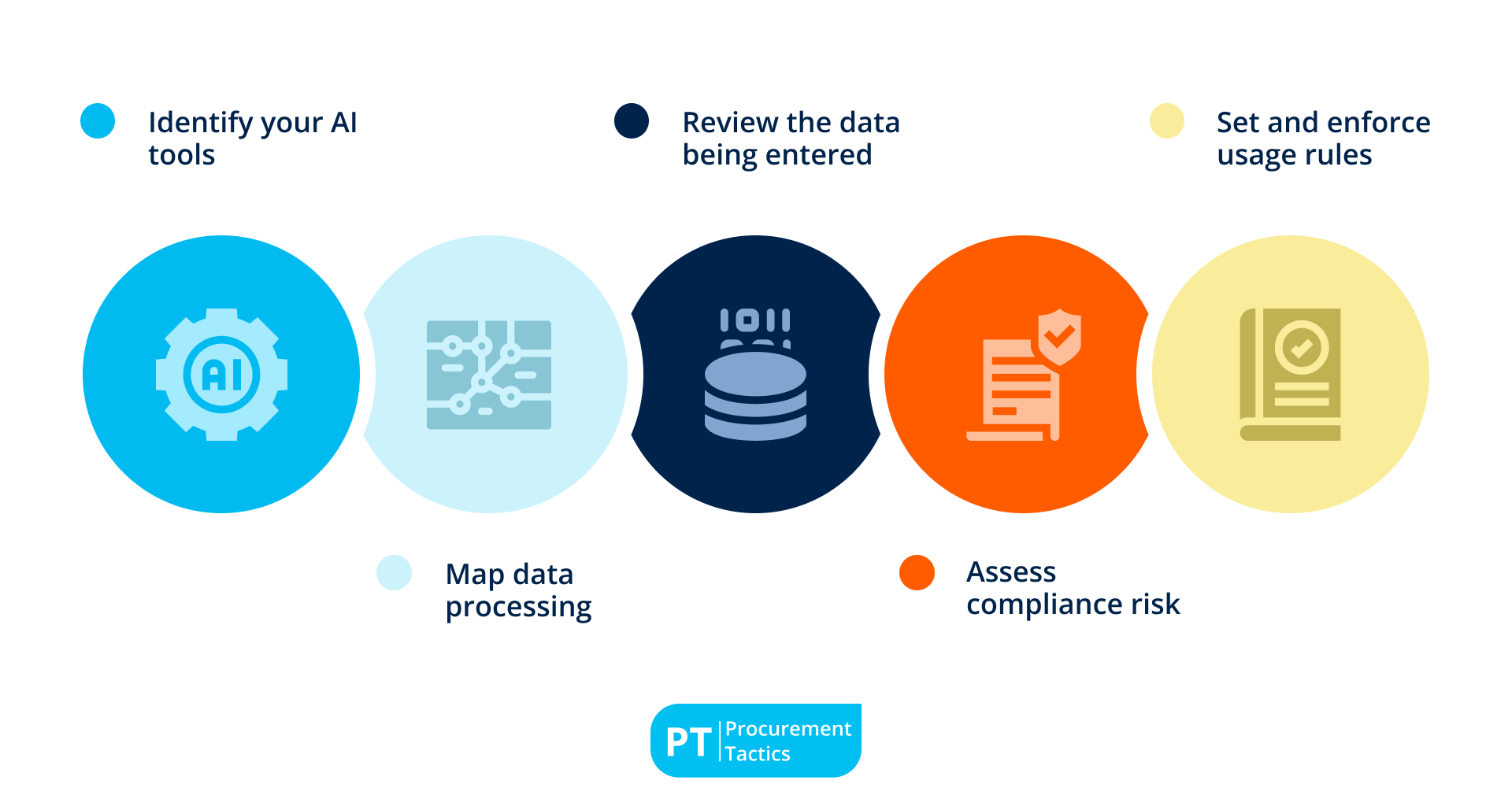
To prevent AI security failures, procurement leaders should regularly audit their AI usage and ensure that all AI tools meet strict security standards. A simple step-by-step AI security audit includes:
1. Identify your AI tools
List every AI tool in use across procurement, including chat assistants, document analyzers, automation platforms, analytics, and any “shadow IT” plug-ins. Capture who uses each tool, what it’s used for, and what data it touches. This becomes your master register for audits and approvals.
2. Map data processing
For each tool, confirm whether prompts/uploads are stored, shared with subprocessors, or used to train models, and for how long. Note where data is processed and stored (region, cloud), and whether you can disable data retention and model training. Distinguish public tools from enterprise deployments with privacy controls.
3. Review the data being entered
Identify the specific use cases and the exact data fields involved, such as contract clauses, pricing and discount terms, internal budgets and forecasts, supplier financials, or risk notes. Flag anything confidential or regulated. Require redaction or substitution with sample data when the task does not need real sensitive information.
4. Assess compliance risk
Check each tool against company security policies, data protection laws (for example, GDPR), cross-border transfer rules, confidentiality obligations, and record retention requirements. Verify vendor certifications and contractual terms (such as DPAs, breach notifications, and deletion rights). Document any gaps and required conditions to use.
5. Set and enforce usage rules
Write plain-language do’s and don’ts for each tool: what data is allowed, what is prohibited, when to use enterprise-only models, and when human review is required. Define approval steps for high-impact outputs (supplier awards, contract language, pricing recommendations). Communicate these rules to users and monitor for compliance.
Best Practices for Preventing Human Error
Technology controls fail if people are unclear about the rules. You can reduce risk by practicing the following:
1. Security awareness sessions
Run short, recurring sessions that explain data-privacy risks and safe AI usage in procurement workflows. Use real examples from your environment, reinforce the “when in doubt, don’t paste” rule, and make escalation paths to Legal/IT clear.
2. Clear do/don’t rules
Publish a one-page guide that spells out what’s allowed and prohibited (for example: never enter confidential pricing, contract language, budgets, or PII into public AI tools). Surface these rules where tools open and require attestation during onboarding.
3. Role-based access
Set up restricted AI access for sensitive procurement workflows, allowing only approved AI models to process confidential data.
4. Monitoring and audits
Review audit logs regularly, and spot-check prompts/outputs for sensitive content. Follow up quickly with coaching or access changes when issues appear to keep usage aligned with policy.
Conclusion
AI is not risky by itself. It becomes risky when teams do not understand how it handles data.
Treat every AI tool like a system that processes sensitive information. Inventory it, test it, control it, and train people to use it correctly.
Before use, verify storage, training, residency, access, and logging. Run a five-question preflight check as the gate. Perform a security audit to map data processing and sensitivity. Strengthen the human layer with clear rules, restricted access to enterprise deployments, and regular monitoring to catch exceptions early.
If a tool does not meet policy or legal standards, allow it only for non-sensitive tasks or block it completely. With these guardrails, procurement teams can use AI safely. They protect contracts, pricing, and supplier data while gaining speed and reliability without losing trust or compliance.
Frequentlyasked questions
What is AI security in procurement?
AI security in procurement is the set of controls that keep supplier, contract, and pricing data safe when using AI tools—covering storage, training, access, compliance, and user behavior.
Why isn’t AI secure by default?
Many AI services retain prompts and outputs or process data outside your control unless you use enterprise deployments and configure privacy settings.
What data should never go into public AI tools?
Confidential contract language, pricing and discount terms, internal budgets and forecasts, personally identifiable information, and any data restricted by policy or law.
About the author
My name is Marijn Overvest, I’m the founder of Procurement Tactics. I have a deep passion for procurement, and I’ve upskilled over 200 procurement teams from all over the world. When I’m not working, I love running and cycling.

Procurement Roles Overview
Click on a role to learn more